Showing posts with label production. Show all posts

Sunday, April 28, 2013

Isadora | Network Control

For an upcoming show one of the many problems that I'll need to solve is how to work with multiple machines and multiple operating systems over a network. My current plan for addressing the needs of this production will be to use one machine to drive the interactive media, and then to slave two computers for cued media playback. This will allow me to distribute the media playback over several machines while driving the whole system from a single machine. My current plan is to use one Mac Pro to work with live data while slaving two Windows' 7 PCs for traditionally cued media playback. The Mac Pro will drive a Barco, while the PC's each drive a Sanyo projector each. This should give me the best of both worlds in some respects. Distributed playback, similar to WatchOut's approach to media playback, while also allowing for more complex visual manipulation of live-captured video. 

To make all of this work, however, it's important to address how to get two different machines running Isadora on two different operating systems to talk with one another. To accomplish this I'm going to use an OSC Transmit actor on the Master machine, and an OSC listener on the slaved machines. 

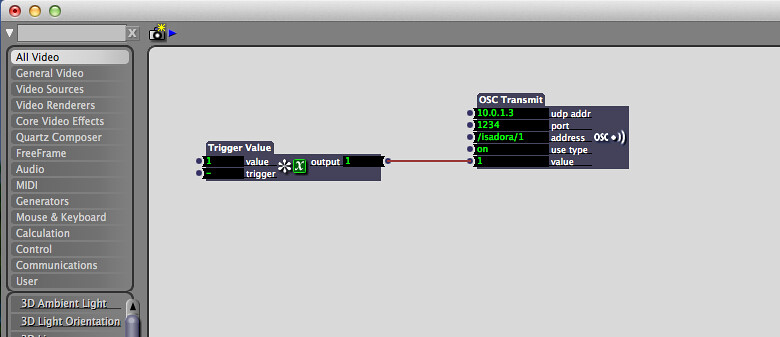
On the Master machine the set-up looks like this:
Trigger Value - OSC Transmit
The transmit actor needs the IP address of the slaved machines, as well as a port to broadcast to. The setup below is for talking to just one other machine. In my final setup I'll create a specialized user actor that holds two OSC Transmit actors (one for each machine) that can be copied into each scene.

On the Slaved machines the setup takes two additional steps. First off it's important to determine what port you want to receive messages from. You can do that by going to Isadora Preferences and selecting the Midi/Net tab. Here you can specify what port you want Isadora to listen to. At this point it's important to catch the data stream. You can do this by oping up the Communications tab and selecting Stream Setup. From here make sure that you select "Open Sound Control" and click the box "Auto-Detect Input." At this point you should see the Master Machine broadcasting with a channel name an address, and a data stream. Once this is setup the Actor patch for receive messages over the network looks like this:
OSC Listener - Whatever Actor you Want
In my case I'll largely use just jump++ actors to transition between scenes, each with their own movie. 
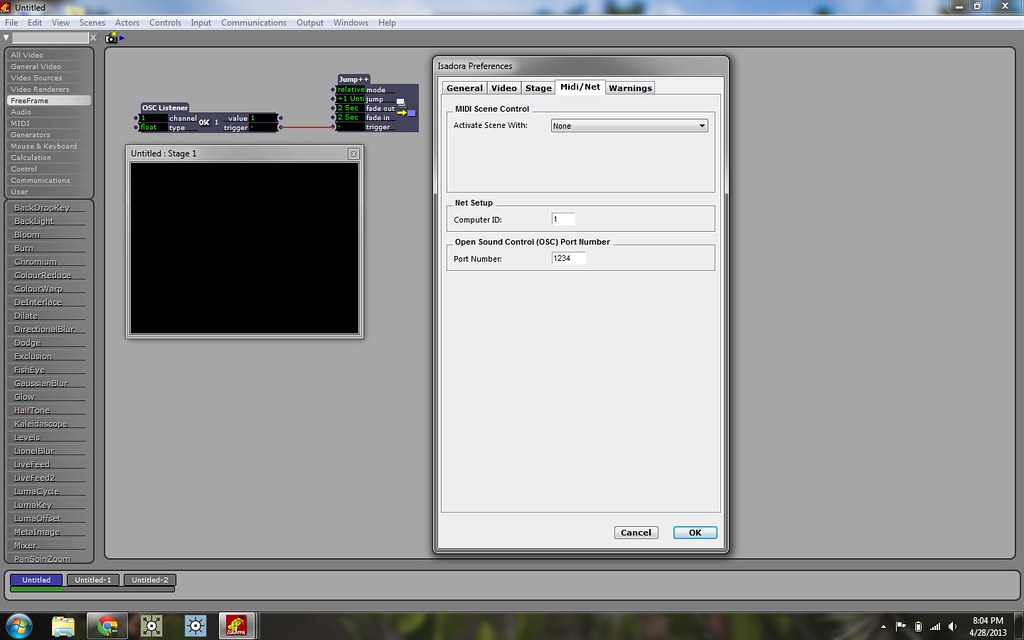

You can, of course, do much more complicated things with this set-up all depending on your programming or play-back needs. 

Isadora | Live-Camera Input as a Mask


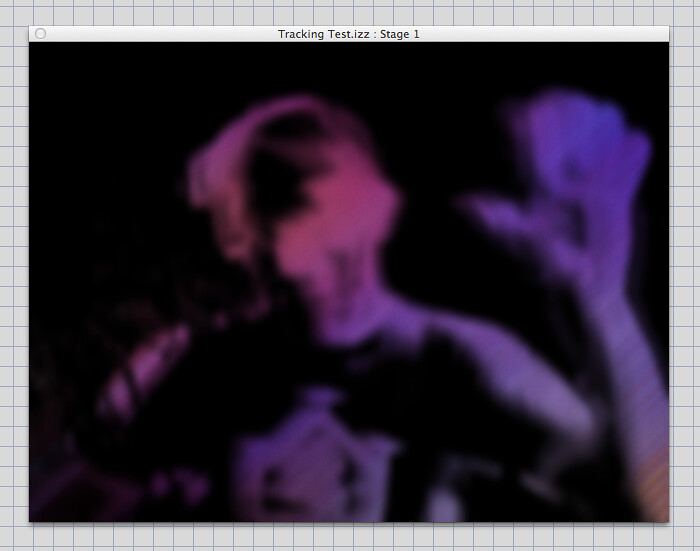
Back in March I had an opportunity to see a production called Kindur put on by the Italian Company Compagnia TPO. One of the most beautiful and compelling effects that they utilized during the show was to use a live-camera to create a mask that revealed a hidden color field. The technique of using a live feed in this way allows a programmer to work with smaller resolution input video while still achieving a very fluid and beautiful effect. 

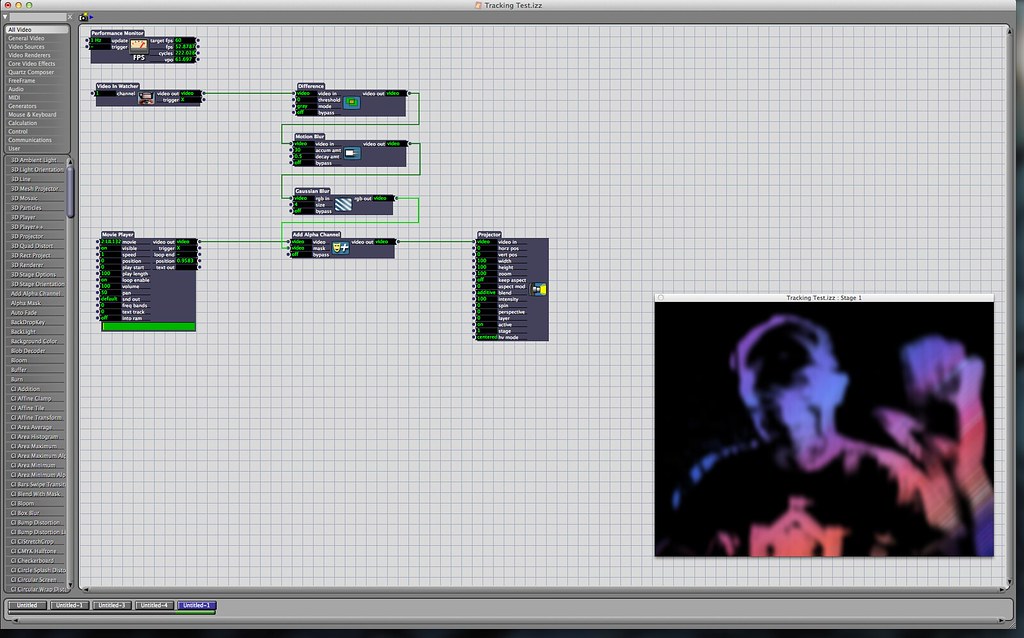
This effect is relatively easy to generate by using just a few actors. An overview of the whole Isadora Scene looks like this:


To star this process we'll start with a Video-In Watcher actor. The video-in will be the live feed from our camera, and will ultimately be the mask that we're using to obscure and reveal our underlying layer of imagery. This video-in actor connects to a Difference actor which looks for the difference between two sequencial frames in the video stream. This is then in turn passed to a Motion Blur actor. The motion blur actor will allow you to specify the amount of accumulated blur effect as well as the decay (disappearance rate) of the effect. To soften the edges of this the image stream is next passed to a Gaussian Blur actor. Finally this stream is passed to an Add Alpha Channel actor by passing the live feed into the mask inlet on the actor. The underlying geometry is then passed in through the video inlet in the Add Alpha Channel actor. Finally, the outlet of the Add Alpha actor is passed out to a projector. 


As a matter of best-practice I like to use a Performance Monitor actor when I'm creating a scene in order to keep an eye on the FPS count. This can also be useful when trying to diagnose what's causing a system to slow down during playback. 

This effect works equally well over still images or video, and is certainly something that's fun to experiment with. Like all things in live systems, your milage may vary - motion blur and gaussian blur can quickly become resource expensive, and it's worth turning down your capture settings to help combat a system slow-down.

Wednesday, April 24, 2013

Soot and Spit | Particles in Isadora

Holy challenges Batman. It seems like I'm constantly being humbled by the learning curve of graduate school. This spring one of ASU's productions is Charles Mee's Soot and Spit. 


Soot and Spit is grounded in the work of James Castle, an artist who was deaf and possibly autistic. One of the most powerful outlets for expression in Castle's life was making art. He made countless works over the course of his life, and one of the mediums that he used was a mixture of soot and spit. With this as a contextual anchor the lead designer, Boyd Branch, was interested in exploring the possibility of using particles as a part of his final design. 

One of my charges in working on this production was to explore how to work with particles in Isadora (our planned play-back system). I started this process by doing a little digging on the web for examples, and the most useful resource that I found as a starting point was the Mark Coniglio (Isadora's creator) example file. Here Mark has a very helpful breakdown of several different kinds of typical operations in Isadora, including a particle system. Looking at the Particle System Actor can feel a little daunting. In my case, The typical approach of toggling and noodling with values to look for changes wasn't really producing any valuable results. It wasn't until I took a close look at Mark's example patch that I was able to finally make some head way.

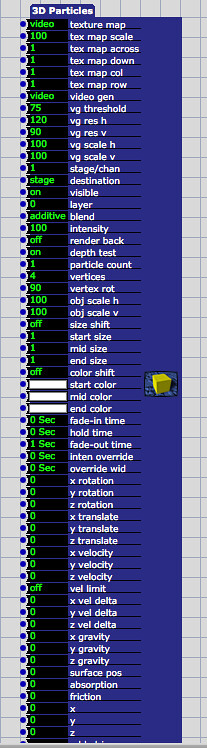
We can start by looking at the 3D particle actor and working through a few important considerations to keep in mind when working with 3D particles in Isadora. One thing to remember is that when you're creating particles, the rendering system needs multiple attributes for each particle that you're generating (location in x, y, and z, velocity, scale, rotation, orientation, color, lifespan, and so on). To borrow a idiomatic convention from MaxMSP, you have to bang on these attributes for every particle that you create. There are a variety of methods for generating your bang, but for the sake of seeing some consistent particle generation I started by using a pulse generator. Pulse generators in Isadora are expressed in hertz (cycles per second), and when we're working with our particle system we'll frequently want a pulse generator to be attached at the front end of our triggers. To that end, we really want a single pulse generator to be driving as much of our particle generation as possible. This is to ensure all of our data about particle generation is synchronized, and to keep our system over head as low as possible. 

Let's get this party started by making some conceptual plans about how we want to experiment with particles. I started by thinking of the particles as being emitted from a single source and being affected by gravity in a typical manner, i.e. falling towards the ground. 

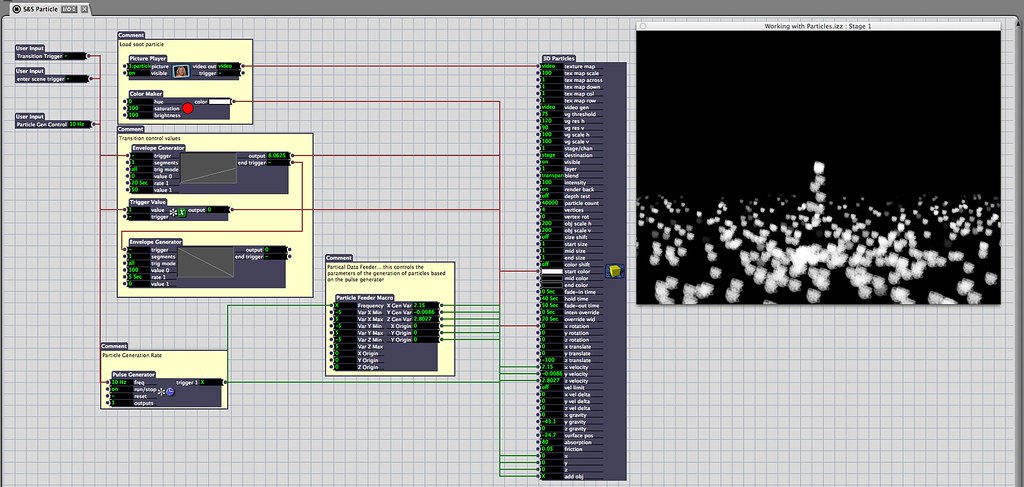
Here's my basic particle emitter set-up for this kind of setup:


Let's start by taking a look at the things we need to get started. As I mentioned before we need to start by frist getting a pulse generator set-up. Let's start by adding a pulse generator, and looking at where it's connected:


Here we can see that the pulse generator is hooked up to a custom user actor that I've called "Particle Feeder," and to the "Add Obj" attribute in the 3D particle Actor. This approach is making sure that we're only using a single pulse generator to bang on our particle system - pushing attribute changes and add object changes.

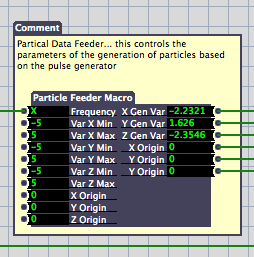
Next let's look at the Particle Feeder actor that I made to make this process easier:


In just a moment we'll take a look inside of this user actor, but before we dive inside let's examine how we're feeding the particle generator some information. Frequency is the input for the pulse generator, this is how quickly we're generating particles. Var X, Y, and Z are used to generate a random range of velocities for our particles between an upper and lower limit. This makes sure that our particles aren't uniform in how they're moving in the space. If we don't have any variation here our particles will all behave the same way. Finally we have a location for our emitter's location: Origin X, Y, and Z. It's important to remember that the particle system exists in 3D space, so we need three attributes to define it's location. On the right side of the actor we can see that we're passing out random values between our min and max values for X, Y, and Z as well as a X, Y, and Z origin data. 

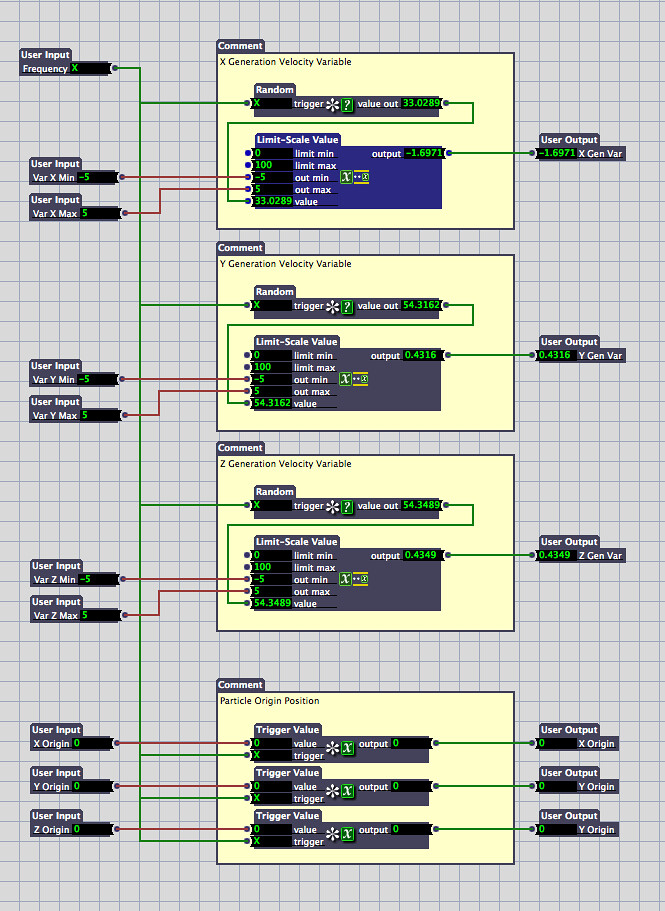
Inside of this custom actor we see this:


At first glance we can see that we have four blocks of interest for this actor. First off it's important to notice that our Frequency input is passed to all of our modules. The first three modules are copies of one another (one for X, Y, and Z). We can see here that our pulse generator is banging on a random number generation actor, that random value (from 0 to 100) is then passed to a Limit-Scale Value actor. The limit scale actor takes an input value in a specified range and scales it to another range. In our case it's taking values between 0 and 100 and scaling them to be between -5 and 5. The resulting value is then passed out of this macro to it's corresponding value.  Our bottom block pushing out data about our emitter location. It's important to remember that we need to pass out the origin location for each particle that's generated. This is why the location information is passed through a trigger value that's being triggered by our systems pulse generator.

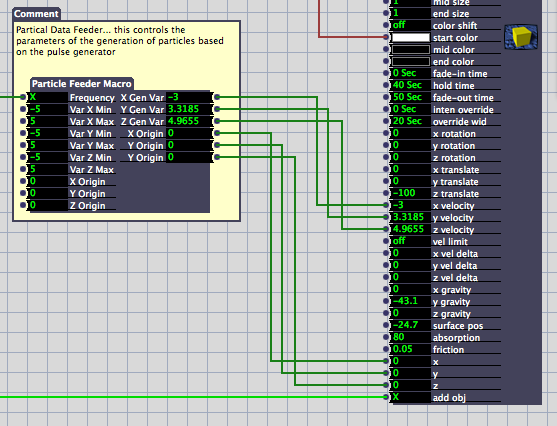
If we jump back out of our user actor can see how our input parameters are then passed to the 3D particle actor:


Ultimately, you'll need to do your own experimenting with particle systems in order to get a firm handle on how they work. I found it useful to use custom actors to tidy up the patch and make sense of what was actually happening. I think the best way to work with particles is to get something up and running, and then to start by changing single attributes to see what kind of impact your change is making. If you're not seeing any changes you may try passing your value through a trigger that's attached to your pulse generator - remember that some attributes need to be passed to each particle that's generated. 

Are some of these pictures too small to read? You can see larger versions on flickr by looking in this album: Grad School Documentation. 


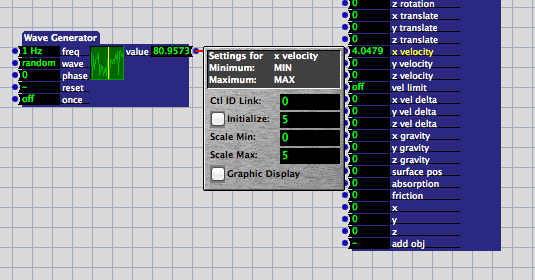
One of the great joys of sharing your work is the opportunity to learn from others. John Collingswood (for more about John check out dbini industries and Taikabox), pointed out on Facebook that one of the very handy things you can do in isadora is to constrain values by setting the range of an input parameter. For example, I could forgo the min-max system set-up with my user actor and instead scale and constrain random values in the 3D particle input. When you click on the name of an input on an actor your get a small pop-up window which allows you to specify parameters for that input's range and starting values. This means that you could connect a wave generator (with the wave pattern set to random) to an input on a 3D particle actor and then control the range of scaled values with the 3D particle actor. That would look something like this:


Thursday, January 31, 2013

Sparrow Song | Drawing with Light


In January I was a contributing digital artist to a production called Sparrow Song. The production focused on the creation of an interactive art-installation / theatrical environment. The production begins with a short performance where audience members are introduced to various interactive elements in the playing space. After the short "play" the audience is invited to explore and play in the art-installation themselves. 

Mad-Mapper is a very powerful tool for quickly mapping spaces, but it's not always the best tool for theatrical play-back. For theatrical productions artists start by creating a series of masks as tools to isolate or highlight scenic elements with projector light. These masks are in many ways analogous to mattes used in photography or video editing. In order to isolate media in the space, each element that had a unique mediated element required its own mask. Further, each projector out-put also needed to be masked in order to avoid spill or bleed between projectors.

One of the effects that I've used in two productions now is where lines appear to draw-in over time in a video. This effect is fairly easy to generate in After Effects, and I wanted to take a quick moment to detail how it actually works. This process can start many ways. For Sparrow song it started by connecting a laptop directly to the projectors being used, and using photoshop to map light directly onto the set. You can see in the photo to the right that each surface that's intended to be a building has some kind of drawn on look. In photoshop each of these buildings exists as an independent layer. This makes it easy to isolate effects or changes to individual buildings in the animation process.


Here's a quick tutorial about how I animated the layers to create the desired effect:


Now that I've done this several times it finally feels like a fairly straightforward process - even if it can be a rather time consuming one.

Here's an example of what the rendered video looks like to the playback system.


Making the asset itself is only a part of the process. After you have a video rendered, the next step is to integrate that into your playback system so that it can be controlled during a performance. For Sparrow Song, the playback engine was Isadora, made by Troikatronix. Here's a quick video that covers movie playback in this system.


Here's an album of documentation photos from the closing show.


Tools Used
Digital Drawing Input - Wacom intuos4
Mapping and Artwork - Adobe Photoshop
Animation and Color - Adobe After Effects
Photos - Cannon EOS 7D
Photo Processing - Adobe LightRoom 4
Show Control - Troikatronix's Isadora

Sunday, December 2, 2012

What is a Media Designer

An overhead view of the stage for Bocon
It's difficult to describe what exactly one does as a Media Designer. Prior to this first semester of graduate work I would have likely explained that the work of a media designer is centered around creating artwork that in some way represents and supports the world of the play. I also may well have said that a Media Designer is a person who works to erase the boundaries between the set and projection. A designer who works with light that isn't light in the strictest theatrical sense, a scenic designer who doesn't work with sets in the strictest theatrical sense. 

Now, after assisting on a production at Arizona State University, I might be more hesitant to describe a Media Designer the same way. In many ways the work is so much larger than I could have imagined. In hindsight I'd say that my vision was limited by a full understanding of the challenges, obstacles, and options. These things are difficult to understand abstractly, and only truly become obvious when they are manifest around a particular issue that needs to be solved. 

A confrontation with La Calavera
It is interesting that I would have imagined that the primary work of the designer would be in the creation of the artwork itself. This is a beautiful and romantic idea, but in reality the work of creating content is only a small part of this particular role. Instead, central to the successful implementation of a mediated space, the designer is challenged to resolve issues of how to cover surfaces with projection (read as: using angular geometry to calculate the position of projectors), designing an interconnected system of computers and projectors to realize an artistic vision,consistent playback (read as: determining the most advantageous use of playback systems in regards to questions of stability and ease of use for an operator), programming said media systems, mapping the geometry of surfaces for projection, blending and masking the edges of projection, and of course creating the artwork that fills the surfaces.

In the palace, the realm of the voice keeper
This is complicated, of course, by the fact that it's difficult to see these as independent variables. Instead many of these exist as dependent variables - each problem and solution nested or connected to countless others. Each solution or problem with consequences that are difficult to anticipate your first time around.

In a forest full of dangers
All of that to say that this particular work is more than meets the eye, which stands as a rather ironic statement given how much actually does meet one's eye. It's not unusual for the invisible challenges of a particular role to be larger than one expects, but the challenges I continually find myself facing are ever more surprising in their dependency on mathematics and computation for solution. I suppose that it some come as no surprise that mathematics would be a useful tool in regards to operating a computer, but it has surprised me that understanding the computational problems of these challenges provides for the best insight about their solutions.

In a forest, full of dangers
This has truly been a whirlwind of an experience. I think I've learned more in working on this production than I could have learned in any class on the subject. Educationally that makes for a compelling case in favor of project based learning. That said, in terms of assessment it's difficult to capture and measure what precisely I've learned. Further, it's difficult to determine outright if these problem-solving skills with transfer to other domains or even other similar projects. I suppose in that sense I'll be my own longitudinal study.

A moment in the court at the beginning and the end of Bocon
Though, in truth that's really what education is for any individual. That's what education is trying so desperately to unpack, to standardize, to measure, and to reproduce. Does solving problems in real-world scenarios with high stakes make for the best learning? Sometimes. Does abstract conceptual exploration and investigation work to make creative thinkers? Sometimes. At least in this case I got to make some art out of it.

Thursday, November 29, 2012

Almost Open

La calavera emerges from a trap in the floor 
¡Bocón! is almost open... it's now so close that you can taste it in the coffee we drink all night while we're working, so close that you can smell it in the hazer fluid that's filling the air. In many ways the transition from the initial days of tech and the final dress seem like an impossible transformation. 


It's difficult to see the forest for the trees sometimes, and this experience has been no exception. It seems like there have been countless nights when I've wondered if we'd actually be able to put together the media for this show. My role in this production has been as the assistant to the very talented and driven Dan Fine - a second year MFA student in the Interdisciplinary Digital Media and Performance program at ASU. It's strange to think that we actually started this process back in August when he first asked if I'd be interested in working with him on this project. Our initial meetings, that now seem so long ago, were centered around codifying the ideas and aesthetic that we were hoping to create in designing the media for this show. 


The palace in Miguel's journey 
In thinking back to those initial meetings they provided an invaluable scaffolding for the work that would come as we started to install projectors and create content for the show. Those first meetings helped to unify both our vision and conviction for the show and the ultimate look of what we were looking to create. Central to our conversations was the idea that the visual expression of the show was somewhere between a storybook and abstract art. Dan wanted artwork that supported the story visually, helped to create the world of the play, but didn't distract the audience from the actors in the space. The difficult balance of mediating a production like this is to avoid the impulse to fill the space with so much content that it overpowers the actors on stage. It's been an interesting balancing act to support the action of the space without becoming a distraction to the audience. 

Lost in the forest Miguel is comforted by La Llorona

This process of media design has also left me with more questions than answers about how one might meaningfully examine this work. After several long nights in the theatre and working at home I'm left wondering when my most productive and meaningful work happened: was it productive to be in the theatre until nearly 3:00AM? Was I actually designing quality work after midnight as I fought with After Effects night after night? Did our system of versioning our work facilitate better organization or impede our efforts to implement changes from run to run of the show?

By the sea Miguel talks with a collector of shells
The part of me that obsessively tracked the mileage of a Prius as Lauen Breunig and I drove across the country is left wondering how, and what, I might track in the next show that I design or assist in designing. What would help me be a better practitioner, a better artist, a better scholar? What's the appropriate balance of quantitative and qualitative data to be pulled from my process that might tell a compelling or interesting story? Better yet, what method of data collection is going to be unobtrusive enough to warent implementing - this process is about as resource intensive as it can be already, what kind of investigative instrument is going to yield useful data without providing biased results?

Form the media tech table the view of the show is obscured by confidence monitors 
Looking at the opening of the first ASU show where I've made a significant contribution I can't help but wonder what the next semesters and years hold, what my work will look like, and what I'll do after I leave the desert. 

Sunday, November 18, 2012

Bocon Tech

¡Bocón!

After four days of going to bed between 3:00 and 4:00 AM it finally feels like we're making progress. This challenge is something between the most amazing opportunity and the most terrifying challenge. Here I am, not even a semester into Graduate School and I'm working on a project with three panoramic screens and floor projection: nine projectors, five computers, two media play back systems, two operating systems, two frazzled graduate student media designers, and one children's show. 

Below is a moment from the show as the main character runs through a forest in an attempt to escape an oppressive military force. As the lights change, the floor is painted with a vine-like mandala as the three panoramic screens are slowly fade up revealing a forest of vines, and masks. 

A sample of the floor projection for Bocon
The time and the place of the play read as an abstracted South America - something that straddles an aesthetic that's a strange marriage of expressionism and realism. It's one thing to think about that in terms of production meetings, and another to see it finally materialize. In this way it's interesting to finally see a fuller representation of the production. 

One of the three 35 foot panoramic screens that surround the audience for Bocon
Strange to me has been the experience of getting tossed headlong into this whole process. The learning curve on this process has felt like more like a straight line than a curve. As this show has developed it's felt as though there are new techniques, software, and concepts to learn at every turn. For every new method I've started to digest, there are another 10 to add to the list to learn later. More than ever the idea of life-long learning is something that I keep coming back to... it's just a matter of continuing to learn and apply techniques and process. I came to grad school to learn lots of tools and techniques, and already I'm quickly finding that I've actually come to grad school to learn how much more there is to learn.

Tools Used:
Media Control for Panoramic Displays - Watchout
Media Control for Floor Projection - Isadora
Media Generation - After Effects, Photoshop